
On this page
The Multi million dollar question: Why doesn't a C code directly converts to assembly or machine code.
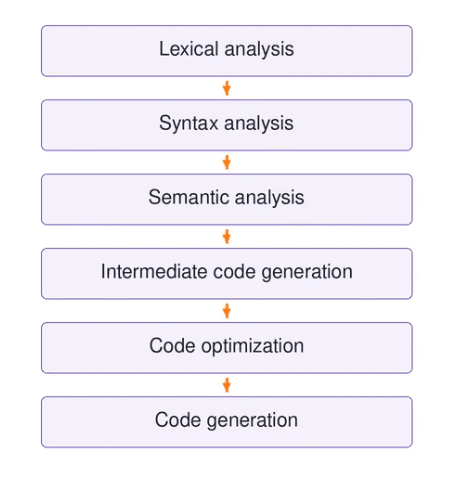
Well the answer is pretty simple. Lets take an example of human body. When we eat food or ingest food its goes through esophagus to large intestine where it gets dissolved in Hcl and imp proteins and whatever is extracted from it (i am not a biology guy) and the to small intestine and then it thrown out of the body so its also takes many steps to reach the end product right. So, if this example works with you lets see this through the perspective of a compiler. a C code goes through multiple stages like:
The problem: Multiple languages, multiple architectures, and the complexity of optimization.
We have like tons of languages in our world and each have a different syntax, ideology, namings etc. So, each having a different compiler or even a same compiler for a collection of languages like GCC is for c/c++/fortran and else so how would a compiler know which language is this to ingest it down further Lets know the answer.
GCC - GNU Compiler Collection
Let's understand how GCC Compiler pipeline works using a simple C code
#define SCALE 2#define LIMIT 20#define ADJUST(value) ((value) - 5)int calculate(int a, int b) { int sum = a + b; int result = sum * SCALE; if (result > LIMIT) { result = ADJUST(result); } return result;}int main(void) { int x = calculate(5, 7); return x;}This is trace.c - The Source Code which we will use to trace out the GCC pipeline.
Stage 1: Macros and Preprocessors
The first stop in the pipeline is the preprocessor. It doesn't understand C at all. It only works on text like find, replace, paste etc. Well, we can tell GCC to stop right after this stage with the -E flag:
gcc-16 -E trace.c -o trace.iHere's what GCC produced:
# 0 "trace.c"# 0 "<built-in>"# 0 "<command-line>"# 1 "trace.c"int calculate(int a, int b) { int sum = a + b; int result = sum * 2; if (result > 20) { result = ((result) - 5); } return result;}int main(void) { int x = calculate(5, 7); return x;}So what changed?
1. Macros got replaced.
Here, SCALE became 2, LIMIT became 20 and ADJUST(result) became ((result) - 5). The preprocessor didn't calculate anything actually it just copied and pasted the text literally like Find & Replace in a text editor.
2. Comments are gone.
The lines "// Object-like macros" and "// Function-like macro" were deleted. The compiler never sees any comments in the code. They are only for us humans or more like coders (hehe).
3. The #define lines disappeared but left empty lines were left behind.
Those 7 blank lines at the top are there on purpose. They keep the rest of the code on the same line numbers as the original file. So, if the compiler finds an error on line 12 it really means line 12 of trace.c.
4. Some weird # lines showed up at the top.
These are called linemarkers. They are notes the preprocessor leaves for the compiler saying like "this code came from this file, at this line." Now, here's what each one means:
a) 0 "trace.c": "I'm starting to read trace.c."#
b) 0 "<built-in>": macros GCC creates by itself, like the compiler version or the CPU type.#
c) 0 "<command-line>": macros we could pass while running the command (we didn't pass any).#
d) 1 "trace.c": "Back to trace.c. The real code starts at line 1."#
We didn't include any header files so this part stays short. If we had written #include <stdio.h>, the preprocessor would have pasted hundreds of lines from that file right here.
By the way why does ADJUST have so many brackets? Let's see:
Well, because the preprocessor only swaps text. It doesn't understand math. Say we had written ADJUST without brackets like this: value - 5. Then ADJUST(result) 2 would turn into result - 5 2. But we now that multiplication happens first, so that's result - 10, not (result - 5) * 2. The brackets make sure the math happens in the order we want.
In short: after this stage we are left with clean and plain C code. No macros, no comments, no includes. And, now it's ready for the real compiler.
Stage 2: GENERIC and GIMPLE (this is how GCC sees your code)
After preprocessing, GCC reads the code and turns it into its own internal format. It doesn't go straight to assembly. Instead, it rewrites the code in two forms called GENERIC and GIMPLE. We can ask GCC to show us both:
gcc-16 -O0 -c -fdump-tree-original -fdump-tree-gimple trace.chere, -O0 means "no optimizations" so we see the code almost exactly as we wrote it. The two -fdump flags tell GCC to save its internal forms into files. So, we get two new files: trace.c.006t.original (GENERIC) and trace.c.007t.gimple (GIMPLE). The numbers in the names show the order GCC creates them in.
Part A: GENERIC
;; Function calculate (null);; enabled by -tree-original{ int sum = a + b; int result = sum * 2; int sum = a + b; int result = sum * 2; if (result > 20) { result = result + -5; } return result;};; Function main (null);; enabled by -tree-original{ int x = calculate (5, 7); int x = calculate (5, 7); return x;}return 0;GENERIC is the first form GCC builds after reading C. Inside GCC it's actually a tree like a family tree of the code and this file just prints that tree back in a C like way. Well, there are several things to notice here. let's see:
1. The variables show up twice. This isn't a bug btw. GCC first prints the list of variables that live inside this block of code. and, then it prints the actual statements that create them.
2. result - 5 became result + -5. GCC likes to write every subtraction of a number as adding a negative number. To a computer they are the same and having just one way to write it makes GCC's later work easier. and even with optimizations turned off GCC is already tidying up the code.
3. A "return 0;" appeared at the end of main. We never wrote that. The C language says that if main reaches its end without returning so it returns 0 automatically so GCC adds it for us. (helpful right)
4. "(null)" next to the function names. well, nothing to worry about. GCC just hasn't filled in some internal details at this point. That comes later
Part B: GIMPLE
int calculate (int a, int b){ int D.4606; int sum; int result; sum = a + b; result = sum * 2; if (result > 20) goto <D.4604>; else goto <D.4605>; <D.4604>: result = result + -5; <D.4605>: D.4606 = result; return D.4606;}int main (){ int D.4608; { int x; x = calculate (5, 7); D.4608 = x; return D.4608; } D.4608 = 0; return D.4608;}GIMPLE is GENERIC made simpler and stricter. This is the form GCC really works with. The things to notice here as before are:
1. All the variables are declared at the top. In GENERIC we had int sum = a + b, which creates and fills the variable in one go. But, GIMPLE splits that into two steps: first declare int sum at the top then do sum = a + b later.
2. Every line does at most one operation. sum = a + b is one addition and result = sum 2 is one multiplication. Our code was already simple, so you can't see much change here. But if we wrote something like x = a + b c - d, GIMPLE would break it into small pieces using temporary variables like one operation per line. This is called three-address code or like 3AC code at most two inputs, one operation and one output per line.
3. The if/else became goto jumps. There are no curly braces anymore. GCC turned our if into: "if result > 20, jump to label D.4604 otherwise jump to label D.4605." Like, labels are just named spots in the code. This is much closer to how a CPU actually works because a CPU doesn't understand blocks it gets only "jump here" and "jump there".
4. New variables like D.4606 and D.4608 appeared. These are temporary variables GCC made up. The D stands for "declaration" and the number is just an internal ID. Here, GCC uses them to hold the return value before returning it.
5. There's dead code at the end of main. Just look at D.4608 = 0; return D.4608 at the very bottom. It comes right after another return so it can never run. It's the leftover "return 0" that GCC added earlier. But, since we used -O0, GCC doesn't bother cleaning it up. With optimizations on later then it gets deleted.
Why does GIMPLE matter? This answers our big question.
Remember the problem from the beginning: which was lots of languages and lots of CPU types. GCC isn't just a C compiler. It also compiles C++, Fortran, Ada, Go, D and more. Each language has its own front end that understands that language's syntax. But, every front end produces the same thing at the end: GENERIC which then becomes GIMPLE.
So by the time we reach GIMPLE, GCC no longer cares which language the code was written in. All the optimizations are written just once for GIMPLE and every language gets them for free. On the other side each CPU like (x86, ARM, RISC-V) only needs to know how to turn GCC's internal code into its own instructions.
Without this middle layer, 5 languages and 5 CPUs would need 25 separate compilers. With it, you need 5 front ends and 5 back ends so 10 pieces and all meeting in the middle at GIMPLE.
Stage 3: SSA and optimization (where GCC gets smart)
So far we used -O0, which means no optimizations. Now we turn them on with -O2 and watch GCC rewrite our code:
gcc-16 -O2 -c -fdump-tree-ssa -fdump-tree-optimized trace.cThis gives us two files: trace.c.024t.ssa and trace.c.273t.optimized. Now, look at the numbers. SSA is pass 24 and the final optimized version is pass 273. That means GCC ran around 250 small passes over our tiny program between these two files. Each pass does one job like say removing unused code, simplifying math or merging functions.
Part A: SSA form
;; Function calculate (calculate, funcdef_no=0, decl_uid=4595, cgraph_uid=1, symbol_order=0)int calculate (int a, int b){ int result; int sum; int _7; <bb 2> : sum_4 = a_2(D) + b_3(D); result_5 = sum_4 * 2; if (result_5 > 20) goto <bb 3>; [INV] else goto <bb 4>; [INV] <bb 3> : result_6 = result_5 + -5; <bb 4> : # result_1 = PHI <result_5(2), result_6(3)> _7 = result_1; return _7;};; Function main (main, funcdef_no=1, decl_uid=4600, cgraph_uid=2, symbol_order=1)int main (){ int x; int _4; <bb 2> : x_3 = calculate (5, 7); _4 = x_3; return _4;}SSA stands for Static Single Assignment. and the rule is simple as: every variable can be given a value only once. If you want to change it, you have to make a new version of it. The things to look or notice here:
1. Variables now have numbers, like sum_4, result_5 and result_6. In our C code result gets a value twice: first sum * 2 then result - 5. But, SSA doesn't allow that so GCC splits it into two different variables: result_5 (the first value) and result_6 (the second value). Now every variable has exactly one place where it was set. And, that makes it really easy for GCC to track where each value came from.
2. a_2(D) and b_3(D). The (D) means "default" i.e. the value the variable already had when the function started. For a and b, that's the numbers passed into the function.
3. The code is split into blocks: bb 2, bb 3, bb 4. bb stands for basic block which means a chunk of code that always runs from top to bottom with no jumps in the middle. A jump can only happen at the end of a block. Numbering starts at 2 because GCC reserves bb 0 and bb 1 as the hidden "entry" and "exit" of every function.
bb 2: calculate sum and result, then check whether result > 20
bb 3: runs only if result > 20, and subtracts 5
bb 4: return the answer
4. The strangest line: PHI.
result_1 = PHI <result_5(2), result_6(3)>
By the time we reach bb 4 which result should we return? well, it depends on how we got there:
If we came straight from bb 2 (the if was false) the answer is result_5.
If we came through bb 3 (the if was true) the answer is result_6.
PHI is GCC's way of saying "pick the value based on which block we came from." It isn't a real instruction the CPU runs. It's bookkeeping that keeps the "one assignment per variable" rule working even when the code branches.
5. [INV] next to the gotos. It means "invalid" i.e. GCC hasn't worked out yet how likely each branch is. It does that later.
Part B: after all optimizations
;; Function calculate (calculate, funcdef_no=0, decl_uid=4595, cgraph_uid=1, symbol_order=0)Removing basic block 5int calculate (int a, int b){ int result; int sum; <bb 2> [local count: 1073741824]: sum_4 = a_2(D) + b_3(D); result_5 = sum_4 * 2; if (result_5 > 20) goto <bb 3>; [50.00%] else goto <bb 4>; [50.00%] <bb 3> [local count: 536870912]: result_6 = result_5 + -5; <bb 4> [local count: 1073741824]: # result_1 = PHI <result_5(2), result_6(3)> return result_1;};; Function main (main, funcdef_no=1, decl_uid=4600, cgraph_uid=2, symbol_order=1) (executed once)int main (){ <bb 2> [local count: 1073741824]: return 19;}This is our code after GCC finished all its passes. The things here to notice:
1. main became just "return 19". This is the best part. Our main called calculate(5, 7) and returned the result. GCC worked out the answer while compiling:
5 + 7 = 12
12 * 2 = 24
is 24 > 20? Yes, so 24 - 5 = 19
So GCC replaced the whole function call with the number 19. When the program runs, it doesn't calculate anything. It just returns 19. There are two optimizations that made this possible:
Inlining: GCC copied the body of calculate into main instead of calling it.
Constant folding: all the inputs were fixed numbers (5 and 7) so GCC did the math itself and kept only the answer.
2. The temporary variable 7 is gone. In the SSA version, GCC copied result1 into 7 and then returned 7. That copy was pointless so GCC removed it and returns result_1 directly.
3. Branch probabilities appeared. [INV] became [50.00%]. GCC has no idea whether result will be bigger than 20 so it guesses 50/50. The "local count" numbers mean the same thing on a different scale: 1073741824 stands for "this block always runs" and 536870912 (exactly half) stands for "this block runs half the time". GCC uses these guesses to decide how to lay out the code so that the more likely path runs faster.
4. "Removing basic block 5". At some point GCC had made an extra block that ended up empty or useless so it deleted it.
5. "(executed once)" next to main. GCC knows main runs exactly once in a program, so it doesn't spend effort making it fast in ways that only help code that runs many times.
6. Why is calculate still there if main doesn't use it anymore? Because calculate isn't marked static like another C file could call it later so GCC has to keep it. If we wrote static int calculate(...), GCC would know nobody else can use it and would delete it entirely.
Stage 4, RTL (GCC's back end)
Until now, everything GCC showed us (GENERIC, GIMPLE, SSA) could run on any CPU. Now GCC moves into its back end and translates the code into RTL (Register Transfer Language). This is where GCC starts thinking about a real CPU. My Mac runs on an ARM chip so everything below is written for ARM. On an Intel/AMD laptop, this stage would look different.
gcc-16 -O2 -c -fdump-rtl-expand -fdump-rtl-final trace.cWe get two files: trace.c.274r.expand (the first RTL pass) and trace.c.371r.final (the last one). The "r" means RTL like just like "t" meant tree before. And btw remember, GIMPLE ended at pass 273. So expand, at 274 is the very next step: the point where GCC crosses from GIMPLE into RTL.
Part A: expand (GIMPLE becomes RTL)
;; Generating RTL for gimple basic block 2;; Generating RTL for gimple basic block 3;; Generating RTL for gimple basic block 4Merging block 3 into block 2...Merging block 5 into block 4...Removing jump 15.(insn 2 5 3 2 (set (reg/v:SI 103 [ a ]) (reg:SI 0 x0 [ a ])) "trace.c":8:29 -1 (nil))(insn 3 2 4 2 (set (reg/v:SI 104 [ b ]) (reg:SI 1 x1 [ b ])) "trace.c":8:29 -1 (nil))(insn 7 4 8 2 (set (reg:SI 105 [ sum_4 ]) (plus:SI (reg/v:SI 103 [ a ]) (reg/v:SI 104 [ b ]))) "trace.c":9:9 -1 (nil))(insn 8 7 9 2 (set (reg/v:SI 102 [ <retval> ]) (ashift:SI (reg:SI 105 [ sum_4 ]) (const_int 1 [0x1]))) "trace.c":10:9 -1 (nil))(insn 9 8 10 2 (set (reg:CC 66 cc) (compare:CC (reg/v:SI 102 [ <retval> ]) (const_int 20 [0x14]))) "trace.c":12:8 -1 (nil))(jump_insn 10 9 11 2 (set (pc) (if_then_else (le (reg:CC 66 cc) (const_int 0 [0])) (label_ref:DI 17) (pc))) "trace.c":12:8 59 {aarch64_bcond} (int_list:REG_BR_PROB 536870913 (nil)) -> 17)(insn 12 11 17 4 (set (reg/v:SI 102 [ <retval> ]) (plus:SI (reg/v:SI 102 [ <retval> ]) (const_int -5 [0xfffffffffffffffb]))) "trace.c":13:16 -1 (nil))(code_label 17 12 20 6 1 (nil) [1 uses])(insn 18 20 19 6 (set (reg/i:SI 0 x0) (reg/v:SI 102 [ <retval> ])) "trace.c":17:1 -1 (nil))(insn 19 18 0 6 (use (reg/i:SI 0 x0)) "trace.c":17:1 -1 (nil))Yes, I know it looks scary with brackets everywhere and overall its also scary. But, RTL is written in a Lisp like style. But each insn (short for instruction) is really just one small step. Let's decode it.
1. How to read one line.
Let's take (set (reg:SI 105 [ sum_4 ]) (plus:SI (reg 103 [ a ]) (reg 104 [ b ]))). Read it inside out: "add register 103 (a) and register 104 (b) and put the result in register 105 (sum_4)." That's just sum = a + b from our C code. The names in square brackets like [ a ] and [ sum_4 ] are hints GCC leaves so we can tell which variable is which.
2. What do SI, DI and CC mean?
These are sizes. SI means a 32 bit value which is our int. DI means a 64 bit value. CC means "condition code" which a special place where the CPU stores the result of a comparison.
3. Two kinds of registers.
x0 and x1 are real ARM registers. On ARM the first argument of a function always arrives in x0 and the second in x1 and the return value must be put in x0. Registers like 102, 103, 104 and 105 are fake (and GCC calls them pseudo registers). At this point GCC pretends the CPU has unlimited registers. So, it will swap them for real ones later. That's why insns 2 and 3 just copy a and b out of x0 and x1 into pseudo registers.
4. sum * 2 became a shift.
Look at insn 8: ashift ... (const_int 1). That's "shift left by 1". In binary, shifting left by one place is the same as multiplying by 2 like adding a zero at the end of a decimal number multiplies it by 10. Like for a CPU, shifting is cheaper than multiplying so GCC swapped it. This trick is called strength reduction.
5. The if got flipped.
In our C code we wrote "if result > 20, subtract 5". In RTL, insn 9 compares result with 20 and jump_insn 10 says "if result <= 20 (le = less or equal) jump to label 17", which skips the subtraction. Well same logic just turned around: "skip it if not needed" instead of "do it if needed".
6. Every line remembers where it came from.
"trace.c":9:9 means this instruction came from line 9, column 9 of our file. Even after all these changes GCC keeps track so debuggers can point back to your source code.
7. The -1 at the end and {aarch64_bcond}.
-1 means GCC hasn't yet matched this step to a real ARM instruction. The jump already has one like {aarch64_bcond} which is ARM's "branch if condition" instruction. So, by the final stage every line will have one of these.
8. "Merging block 3 into block 2".
Even while translating GCC keeps tidying up like joining small blocks together and removing jumps it doesn't need.
Part B: final (the last RTL, just before assembly)
(insn:TI 7 36 8 (set (reg:SI 0 x0 [orig:105 sum_4 ] [105]) (plus:SI (reg:SI 0 x0 [orig:109 a ] [109]) (reg:SI 1 x1 [orig:110 b ] [110]))) "trace.c":9:9 156 {*addsi3_aarch64} (expr_list:REG_DEAD (reg:SI 1 x1 [orig:110 b ] [110]) (nil)))(insn:TI 8 7 34 (set (reg/v:SI 0 x0 [orig:102 <retval> ] [102]) (ashift:SI (reg:SI 0 x0 [orig:105 sum_4 ] [105]) (const_int 1 [0x1]))) "trace.c":10:9 799 {*aarch64_ashl_sisd_or_int_si3} (nil))(insn:TI 34 8 35 (set (reg:SI 1 x1 [107]) (plus:SI (reg/v:SI 0 x0 [orig:102 <retval> ] [102]) (const_int -5 [0xfffffffffffffffb]))) "trace.c":13:16 156 {*addsi3_aarch64} (nil))(insn 35 34 18 (set (reg:CC 66 cc) (compare:CC (reg/v:SI 0 x0 [orig:102 <retval> ] [102]) (const_int 20 [0x14]))) "trace.c":13:16 453 {cmpsi} (nil))(insn 18 35 19 (set (reg/i:SI 0 x0) (if_then_else:SI (gt (reg:CC 66 cc) (const_int 0 [0])) (reg:SI 1 x1 [107]) (reg/v:SI 0 x0 [orig:102 <retval> ] [102]))) "trace.c":17:1 505 {*cmovsi_insn} (expr_list:REG_DEAD (reg:CC 66 cc) (expr_list:REG_DEAD (reg:SI 1 x1 [107]) (nil))))(insn 19 18 48 (use (reg/i:SI 0 x0)) "trace.c":17:1 -1 (nil))(note 48 19 42 NOTE_INSN_EPILOGUE_BEG)(insn 42 48 43 (use (reg:DI 30 x30)) "trace.c":17:1 -1 (nil))(jump_insn:TI 43 42 44 (return) "trace.c":17:1 97 {*do_return} (nil) -> return)This is the last version of our code before GCC writes assembly. and to not a surprise a lot changed:
1. The fake registers are gone.
Everything now uses only x0 and x1 which are the real ARM registers. This step is called register allocation wich one of the hardest jobs in any compiler. GCC still leaves a note like [orig:105 sum_4] so we can see which fake register became which real one. did you notice how GCC reuses x0 again and again: a then sum then result like all in the same register because it never needs the old value once the new one is calculated.
2. The if is completely gone. No jump anymore!
This is the coolest change(i love it). Instead of "compare, then jump over the subtraction" GCC now does this:
insn 34: calculate result - 5 anyway and keep it in x1
insn 35: compare result with 20
insn 18: if result > 20, pick x1 (result - 5) otherwise keep x0 (result)
So GCC does both possible answers and then simply picks one. But, why do extra work here? well, because jumps are expensive for modern CPUs. The CPU tries to guess which way an if will go before it knows the answer and when it guesses wrong it has to throw away work and start again. One subtraction is much cheaper than a wrong guess. This trick is called if-conversion and on ARM the "pick one" step becomes a single instruction called csel (conditional select).
3. Every instruction now has a name in curly braces.
{*addsi3_aarch64} (add), {*aarch64_ashl_sisd_or_int_si3} (shift left), {cmpsi} (compare), {*cmovsi_insn} (conditional select), {*do_return} (return). These names come from GCC's machine description for AR which is a file that lists every instruction the ARM CPU has and how it looks in RTL. Every line now matches exactly one real ARM instruction. And, turning this into assembly text is now almost a copy job.
4. REG_DEAD notes.
REG_DEAD (reg x1) means "after this instruction, nobody needs x1 anymore." GCC uses these notes to know when a register is free to reuse.
5. x30 and return.
On ARM, x30 holds the return address like where the program should go back to after the function finishes. (use x30) and (return) together mean "jump back to whoever called us."
6. :TI next to some instructions.
This comes from GCC's instruction scheduler which is a pass that reorders instructions so the CPU can run them as quickly as possible. :TI marks where a new group of instructions starts.
7. The Dataflow summary (which I cut).
The real file also starts with a big list of registers like which ones get overwritten by function calls, which ones are used and so on. One useful line is "regs ever live: x0 x1 x30 cc". like our whole function uses just two working registers the return address and the comparison flags. Tiny! (hehe)
And main?
(insn:TI 9 2 10 (set (reg/i:SI 0 x0) (const_int 19 [0x13])) "trace.c":22:1 105 {*movsi_aarch64} (nil))(insn 10 9 19 (use (reg/i:SI 0 x0)) "trace.c":22:1 -1 (nil))(jump_insn 16 15 17 (return) "trace.c":22:1 97 {*do_return} (nil) -> return)Stage 5: Assembly (finally, something a human can read again)
After all those internal forms GCC writes our program as assembly which is a text version of the actual CPU instructions. The -S flag tells GCC to stop here:
gcc-16 -O2 -S trace.c -o trace.s .arch armv8.5-a .build_version macos, 28, 0 .text .align 2 .p2align 5,,15 .globl _calculate_calculate:LFB0: add w0, w0, w1 lsl w0, w0, 1 sub w1, w0, #5 cmp w0, 20 csel w0, w1, w0, gt retLFE0: .section __TEXT,__text_startup,regular,pure_instructions .align 2 .p2align 5,,15 .globl _main_main:LFB1: mov w0, 19 retLFE1: ... .ident "GCC: (Homebrew GCC 16.1.0) 16.1.0" .subsections_via_symbolsOur whole calculate function is now 6 instructions, and main is just 2. Let's connect the dots with Stage 4.
1. Every RTL instruction became one line of assembly.
RTL name (Stage 4) | Assembly | What it does |
|---|---|---|
{*addsi3_aarch64} | add w0, w0, w1 | w0 = a + b |
{*aarch64_ashl_sisd_or_int_si3} | lsl w0, w0, 1 | w0 = w0 shifted left by 1 (that is, × 2) |
{*addsi3_aarch64} with -5 | sub w1, w0, #5 | w1 = w0 - 5 (worked out ahead of time just in case) |
{cmpsi} | cmp w0, 20 | compare w0 with 20 |
{*cmovsi_insn} | csel w0, w1, w0, gt | if greater than: w0 = w1 else keep w0 |
{*do_return} | ret | go back to the caller |
Do you eemember result + -5 from GIMPLE? Here it finally turned back into a normal sub. ARM has a subtract instruction so GCC uses it.
2. Why w0 and not x0?
On ARM, x0 is a 64 bit register and w0 is the lower 32 bit half of that same register. Our int is 32 bits (remember SI from Stage 4) so GCC uses the w version.
3. Let's run it by hand with calculate(5, 7):
Start: w0 = 5, w1 = 7 (the arguments arrive in registers)
add: w0 = 5 + 7 = 12
lsl: w0 = 12 × 2 = 24
sub: w1 = 24 - 5 = 19
cmp: compare 24 with 20 -> it's greater
csel: greater, so w0 = w1 = 19
ret: return w0 = 19 (yayy done)
The same 19 GCC already worked out for main in Stage 3. No jumps anywhere. the code just runs straight from top to bottom.
4. Lines that start with a dot are not instructions.
They're called directives: notes for the assembler and not for the CPU.
.arch armv8.5-a: which version of ARM this code is written for
.build_version macos: this is built for macOS
.text: "the code goes here"
.globl _calculate: make calculate visible to other files so they can call it (remember that's why GCC couldn't delete it)
.align / .p2align: place the function at a nicely aligned memory address because CPUs fetch aligned code faster
.ident: a signature saying which compiler made this file
5. Why _calculate with an underscore?
On macOS, every C function name gets an underscore in front of it. That's just the platform's convention. On Linux the same function would simply be called calculate.
6. LFB0 / LFE0.
Labels marking where each function begins (Function Begin) and ends (Function End). GCC uses them to measure how big each function is.
7. main lives in a different section: __text_startup.
Remember "(executed once)" from Stage 3. GCC knows main runs only once so it puts it in a separate startup section away from code that might run many times. That keeps the frequently used code packed together.
8. The big __eh_frame part at the end (which I cut myself).
This is unwind information. It tells debuggers and crash handlers how to step back out of each function. It's not part of our program's logic so we can skip it.(could be a part of next blog).
Stage 6: Assembling (from text to actual machine code)
Well, Assembly is still just text. The CPU can't read text as it only understands numbers. So the next step is the assembler which turns each line of assembly into binary machine code and saves it in an object file (.o):
gcc-16 -c trace.s -o trace.o-c means "compile and assemble, but don't link yet". Let's look inside trace.o with three tools.
Part A: what kind of file is this?
file trace.otrace.o: Mach-O 64-bit object arm64Mach-O is the file format macOS uses for programs and object files. On Linux this would say ELF and on Windows PE/COFF. Same machine code inside, different packaging around it. arm64 means the code is for 64 bit ARM, my Mac's chip.
Part B: what names are inside?
nm trace.o0000000000000028 s EH_frame10000000000000000 T _calculate0000000000000020 S _main0000000000000000 t ltmp00000000000000020 s ltmp10000000000000028 s ltmp2nm lists the symbols in the file like names attached to addresses. The letter in the middle tells us what kind of symbol each one is:
T (_calculate): a function in the main code section which is visible to other files (that's the .globl from Stage 5)
S (_main): also visible to other files but in a different section. Remember that GCC moved main into __text_startup.
lowercase t and s: local symbols which are only visible inside this file. ltmp0, ltmp1 and ltmp2 are temporary labels the assembler creates at the start of each section. EH_frame1 is that unwind info we skipped earlier.
Now, look at the addresses as: calculate starts at 0 and main at 0x20 (32 in decimal). These aren't real memory addresses yet. They are just positions inside this file. The linker will decide the real addresses in the next stage.
Part C: the actual machine code
objdump -d trace.otrace.o: file format mach-o arm64Disassembly of section __TEXT,__text:0000000000000000 <ltmp0>: 0: 0b010000 add w0, w0, w1 4: 531f7800 lsl w0, w0, #1 8: 51001401 sub w1, w0, #0x5 c: 7100501f cmp w0, #0x14 10: 1a80c020 csel w0, w1, w0, gt 14: d65f03c0 retDisassembly of section __TEXT,__text_startup:0000000000000020 <ltmp1>: 20: 52800260 mov w0, #0x13 ; =19now, objdump -d disassembles the file: it reads the binary back and shows it as assembly. Each line has three parts as: the position (0, 4, 8...), the machine code in hex (0b010000) and the matching assembly instruction.
1. It's exactly our trace.s.
The same 6 instructions for calculate and 2 for main. The only difference is that objdump shows numbers in hex: #0x14 is 20 and #0x13 is 19.
2. Every instruction is exactly 4 bytes.
Now, look at the positions: 0, 4, 8, c, 10, 14. They go up by 4 every time. ARM instructions are always 4 bytes long. That's different from Intel/AMD (x86) where one instruction can be anywhere from 1 to 15 bytes. Fixed size instructions are one reason ARM chips are simpler and more power efficient.
3. Why does main start at 0x20 and not 0x18?
calculate has 6 instructions × 4 bytes = 24 bytes (0x18). But main starts at 32 (0x20). well, remember the .p2align 5 directive from Stage 5? It asks for each function to start at a multiple of 32 (2 to the power of 5) so 8 bytes of padding were left between the two functions.
4. Same instruction, same bytes.
ret shows up twice and both times it's d65f03c0. An instruction always encodes to the same number. That number is what the CPU actually sees.
5. You can find our numbers hidden inside the bytes.
Take main's mov w0, #19 which is 52800260 in hex. ARM packs the value 19 into the middle bits of this number. Write 0x260 in binary (0010 0110 0000) and drop the last 5 bits which say which register to use (00000 = register 0, so w0). what's left is 10011 which is 19 in binary. And, the answer to our whole program is sitting right there in the machine code.
Same for add w0, w0, w1 = 0b010000. Some of its bits say "add" one bit says "use the 32-bit w registers" and three small groups of 5 bits pick the registers: 00001 (w1), 00000 (w0) and 00000 (w0).
6. So can we run trace.o now?
Not yet. An object file is like a puzzle piece. Its addresses are temporary as it doesn't know where it will sit in memory and it isn't connected to the system libraries a program needs to start and exit. Putting the pieces together is the job of the last stage which is the linker.
Stage 7: Linking (the final executable)
We now have an object file full of real machine code but we still can't run it. The last step is the linker. Its job is to take our object file and connect it with the system libraries a program needs, decide the real memory addresses and write out one finished program:
gcc-16 trace.o -o traceNo -E, -S or -c this time so GCC goes all the way to the end. Let's run it:
./traceecho $?19/trace prints nothing because our program never prints anything. All main does is return a number. When a program finishes, that returned number goes back to the terminal as the exit code and echo $? shows the exit code of the last command.
And it's 19. That's the same 19 GCC worked out by itself in Stage 3, that we saw as mov w0, 19 in Stage 5 and that we found hidden inside the bytes 52800260 in Stage 6. We followed one number through the entire compiler.
What changed after linking?
file tracetrace: Mach-O 64-bit executable arm64In Stage 6 this said object. Now it says executable: a complete program the OS can run.
nm trace0000000100000000 T __mh_execute_header0000000100000480 T _calculate00000001000004a0 S _main1. Real addresses now.
In trace.o, calculate sat at 0 and main at 0x20. Now they're at 0x100000480 and 0x1000004a0. The linker placed them into the final program's memory layout. The gap between them is still exactly 0x20 (32 bytes) so the padding from .p2align survived.
2. Why do the addresses start at 0x100000000?
On macOS, programs are loaded starting at the 4 GB mark. The memory below that is a reserved empty area called __PAGEZERO. It's left unusable on purpose so that if a program accidentally uses a null pointer then it crashes right away instead of silently reading garbage. Also, when the program actually runs, macOS shifts everything by a random amount for security. This is called ASLR. So these addresses are the planned layout and not the exact runtime addresses.
3. __mh_execute_header.
A new symbol the linker added. It marks the Mach-O header which is the very start of the program file which describes to macOS how to load it.
4. The temporary labels are gone.
ltmp0, ltmp1, ltmp2 and EH_frame1 were only useful while assembling so the linker threw them away.
otool -L tracetrace: /usr/lib/libSystem.B.dylib (compatibility version 1.0.0, current version 1356.0.0)otool -L lists the shared libraries our program depends on. There's just one which is: libSystem, macOS's core system library. It includes the C standard library (printf, malloc and friends) and the code that talks to the operating system.
But wait, our program doesn't call any library function. So why is it linked? Because on macOS every program must link libSystem. It handles the work around main:= like for say setting things up before main starts and once main returns 19, passing that 19 to the OS as the exit code. On Linux the same role is played by libc.so.6.
The library isn't copied into our program. It's dynamically linked like our file only stores a note saying "I need libSystem". When we run ./trace, macOS's loader (called dyld) finds the library and connects it at that moment. That's why our program stays tiny.
One more detail: on macOS, even Homebrew GCC doesn't use the GNU linker here. It hands this step to Apple's own linker because GNU's linker doesn't support Mach-O. Add -v to the command if you want to see it called.
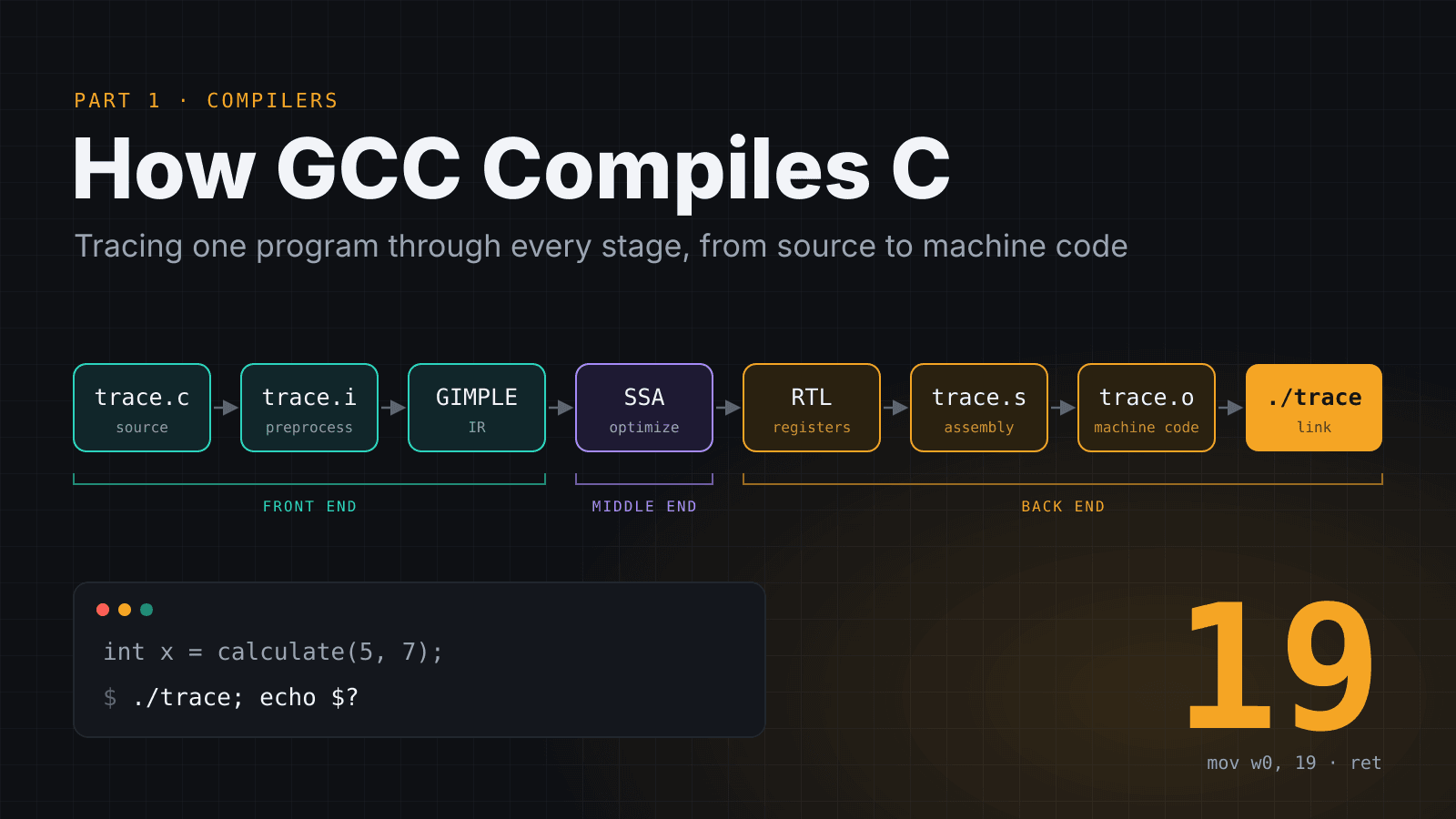
The whole journey in one picture
Stage | Command | Output | What happened |
|---|---|---|---|
1. Preprocessing | gcc-16 -E | trace.i | Macros replaced, comments removed |
2. GENERIC → GIMPLE | -fdump-tree-original / -gimple | .original, .gimple | C turned into GCC's language independent form |
3. SSA + optimization | -O2 -fdump-tree-ssa / -optimized | .ssa, .optimized | ~250 passes; main became return 19 |
4. RTL | -fdump-rtl-expand / -final | .expand, .final | CPU specific: real registers and the if became csel |
5. Assembly | gcc-16 -S | trace.s | Readable ARM instructions |
6. Assembling | gcc-16 -c | trace.o | Binary machine code, temporary addresses |
7. Linking | gcc-16 | trace | Real addresses, libSystem connected, runnable |
So, back to our multi million dollar question: why doesn't C go straight to machine code?
Because each stage solves one problem and solves it well. The preprocessor deals with text. The front end understands C. GIMPLE makes the code language independent so one set of optimizations works for C, C++, Fortran and every other language GCC supports. RTL makes it CPU specific so the same optimized code can become ARM, x86 or RISC-V instructions. The assembler and linker turn it into something the OS can actually load.
If you skipped the middle stages and translated C directly into machine code, you'd have to rewrite all the clever stuff (like turning calculate(5, 7) into 19 or replacing a jump with csel for every single language and every single CPU. The stages are what make a compiler reusable. Like digestion, each organ does one job and passes something more useful to the next.
That completes the GCC half. In the next blog we will see the LLVM part by tracing it out.
Comments